Page Speed Improvements Every Frontend Developer Should Know
Master the essential techniques to optimize website performance, enhance user experience, and boost search engine rankings. Learn proven strategies that can reduce load times by up to 80% and improve conversion rates significantly.
Why Page Speed Matters
Website performance directly impacts user experience, search rankings, and business success. Fast websites retain more users and generate higher conversions.
User Experience
Fast-loading websites create positive user experiences, reduce bounce rates, and increase user engagement across all devices.
SEO Benefits
Search engines prioritize fast websites, improving your visibility and organic traffic through better search rankings.
Business Impact
Faster websites drive higher conversion rates, increased revenue, and better customer satisfaction metrics.
Optimize Images
Large image files can significantly slow down your website. Use appropriate image formats (like WebP for web), compress images without losing quality, and implement responsive images using the srcset attribute to serve different sizes based on the device.
Faster Load Times
Compressed images load quicker, enhancing user experience and reducing bounce rates.
Reduced Bandwidth
Smaller file sizes consume less data, benefiting both users and servers.
Better Mobile Experience
Optimized images are crucial for users on mobile devices with limited data plans.
Example: Responsive Images with srcset
<img
  src="image-small.jpg"
  srcset="image-small.jpg 600w,
          image-medium.jpg 1200w,
          image-large.jpg 1800w"
  sizes="(max-width: 600px) 600px,
         (max-width: 1200px) 1200px,
         1800px"
  alt="Responsive optimized image"
  loading="lazy">
Performance Impact: Using responsive images can reduce image sizes by 30-70% depending on device, significantly improving load times.
Minimize HTTP Requests
Each HTTP request adds latency to your page load time. Reduce the number of requests by combining CSS and JavaScript files, using CSS sprites for icons, and leveraging inline SVGs for simple graphics.
Faster Page Loads
Fewer requests mean less time waiting for resources to load.
Reduced Server Load
Minimizing requests decreases strain on your server, improving performance.
Better SEO Rankings
Search engines prioritize fast-loading websites for better visibility.
Example: File Combination & CSS Sprites
# Combining CSS files
cat style1.css style2.css style3.css > combined-styles.css

# Minify the combined file
cssnano combined-styles.css combined-styles.min.css
.icon {
background-image: url('sprite.png');
background-repeat: no-repeat;
}
.icon-home {
width: 32px;
height: 32px;
background-position: 0 0;
}
.icon-search {
width: 32px;
height: 32px;
background-position: -32px 0;
}Performance Impact: Reducing HTTP requests from 20 to 5 can improve load times by 40-60%.
Use Content Delivery Network (CDN)
CDNs distribute your content across multiple servers worldwide, reducing the distance between your users and your server. This results in faster load times, especially for users located far from your primary server.
Reduced Latency
Content delivered from servers closer to users, speeding up load times globally.
Enhanced Security
Many CDNs offer DDoS protection and SSL encryption for better security.
Better Scalability
Handle traffic spikes without compromising performance or availability.
Example: CDN Implementation
<!-- Load libraries from CDN -->
<script src="https://cdnjs.cloudflare.com/ajax/libs/jquery/3.6.0/jquery.min.js"></script>
<link href="https://cdn.jsdelivr.net/npm/bootstrap@5.1.3/dist/css/bootstrap.min.css" rel="stylesheet">

<!-- Use CDN for static assets -->
<img src="https://cdn.example.com/images/hero-image.webp" alt="Hero image">
Performance Impact: CDNs can reduce load times by 30-50% for global users.
Enable Browser Caching
By setting appropriate cache headers, you can instruct browsers to store static resources locally. This reduces the need for repeated requests on subsequent visits, significantly speeding up page load times.
Faster Repeat Visits
Cached resources load instantly from user's device on return visits.
Reduced Server Load
Fewer requests to your server, freeing up resources for other tasks.
Lower Bandwidth Usage
Reduced data transfer benefits users with limited data plans.
Example: Cache Headers Configuration
<IfModule mod_expires.c>
  ExpiresActive On

  # Images - 1 year
  ExpiresByType image/jpg "access plus 1 year"
  ExpiresByType image/jpeg "access plus 1 year"
  ExpiresByType image/png "access plus 1 year"
  ExpiresByType image/webp "access plus 1 year"

  # CSS and JavaScript - 1 month
  ExpiresByType text/css "access plus 1 month"
  ExpiresByType application/javascript "access plus 1 month"

  # HTML - 1 day
  ExpiresByType text/html "access plus 1 day"
</IfModule>
Performance Impact: Proper caching can reduce load times by 60-80% for returning visitors.
Minify CSS, JavaScript, and HTML
Minification removes unnecessary characters (like whitespace and comments) from your code without affecting functionality. This reduces file sizes and improves load times. Tools like UglifyJS and CSSNano can automate this process.
Reduced File Sizes
Minified files are 20-40% smaller, leading to faster downloads.
Improved Performance
Smaller files require less bandwidth and processing power.
Better SEO Rankings
Search engines favor fast-loading websites for higher rankings.
Example: Minification Process
# Minify JavaScript with UglifyJS
uglifyjs input.js -o output.min.js -c -m

# Minify CSS with CSSNano
cssnano input.css output.min.css

# Minify HTML with html-minifier
html-minifier --collapse-whitespace --remove-comments input.html -o output.min.html
Performance Impact: Minification typically reduces file sizes by 20-40%, improving load times proportionally.
4. Enable Browser Caching
By setting appropriate cache headers, you can instruct browsers to store static resources locally. This reduces the need for repeated requests on subsequent visits, speeding up page load times.
Benefits of Enabling Browser Caching
- Faster Load Times: Cached resources load quickly from the user's device, improving overall site speed.
- Reduced Server Load: Caching decreases the number of requests to your server, freeing up resources for other tasks.
- Improved User Experience: Users experience quicker access to your site on repeat visits, enhancing satisfaction and engagement.
- Lower Bandwidth Usage: Caching reduces data transfer, which can be particularly beneficial for users with limited data plans or slower connections.
Example
Setting cache headers in Apache:
<IfModule mod_expires.c>
  ExpiresActive On
  ExpiresByType image/jpg "access plus 1 year"
  ExpiresByType image/jpeg "access plus 1 year"
  ExpiresByType image/gif "access plus 1 year"
  ExpiresByType image/png "access plus 1 year"
  ExpiresByType text/css "access plus 1 month"
  ExpiresByType application/javascript "access plus 1 month"
</IfModule>
5. Minify CSS, JavaScript, and HTML
Minification removes unnecessary characters (like whitespace and comments) from your code without affecting its functionality. This reduces file sizes and improves load times. Tools like UglifyJS for JavaScript and CSSNano for CSS can help automate this process.
Benefits of Minification
- Reduced File Sizes: Minified files are smaller, leading to faster downloads and improved load times.
- Improved Performance: Smaller files require less bandwidth and processing power, enhancing overall site performance.
- Better SEO Rankings: Search engines favor fast-loading websites, potentially boosting your search rankings.
- Enhanced User Experience: Quicker load times lead to higher user satisfaction and lower bounce rates.
Example
Minifying JavaScript using UglifyJS:
uglifyjs input.js -o output.min.js -c -mMinifying CSS using CSSNano:
cssnano input.css output.min.cssImplement Lazy Loading
Lazy loading defers the loading of non-critical resources until they are needed, significantly improving initial page load times.
<img src="image.jpg" alt="Description" loading="lazy">
<iframe src="video.mp4" loading="lazy"></iframe>Optimize Web Fonts
Use WOFF2 format, limit font weights, and implement font-display: swap for better performance.
@font-face {
  font-family: 'OptimizedFont';
  src: url('font.woff2') format('woff2');
  font-display: swap;
}Minimize Redirects
Each redirect adds latency. Use direct URLs and clean up redirect chains.
# Avoid: example.com → www.example.com → www.example.com/page
# Use direct redirect:
Redirect 301 /old-page /new-pageAsynchronous JavaScript Loading
Use async and defer attributes to prevent JavaScript from blocking page rendering.
<script src="analytics.js" async></script>
<script src="app.js" defer></script>Monitor & Analyze Performance
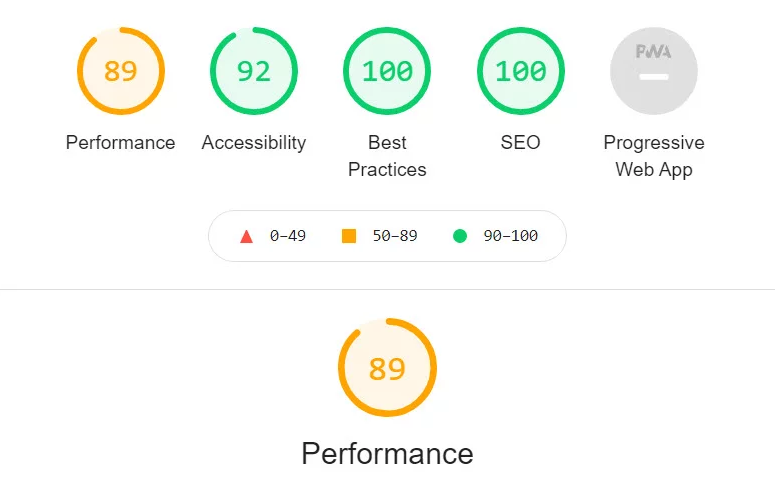
Use tools like PageSpeed Insights, Lighthouse, and WebPageTest for continuous monitoring.
# Run Lighthouse audit
lighthouse https://your-site.com --output=json

# Check Core Web Vitals
https://web.dev/measure/
Performance Optimization Checklist
Use this comprehensive checklist to ensure you've covered all essential performance optimizations.
Image Optimization
- Convert images to WebP format
- Implement responsive images with srcset
- Compress images without quality loss
- Use lazy loading for below-fold images
- Optimize image dimensions for actual display size
Code Optimization
- Minify CSS, JavaScript, and HTML
- Remove unused CSS and JavaScript
- Combine multiple CSS/JS files
- Use async/defer for non-critical scripts
- Optimize critical rendering path
Server & Network
- Enable browser caching with proper headers
- Implement CDN for static assets
- Enable gzip/brotli compression
- Minimize HTTP requests
- Use HTTP/2 or HTTP/3
Monitoring
- Set up Core Web Vitals monitoring
- Regular PageSpeed Insights audits
- Monitor real user metrics (RUM)
- Test on various devices and networks
- Track performance over time
Achieve Lightning-Fast Performance
Transform your website into a speed powerhouse that delights users and dominates search rankings.
Enhanced User Experience
Fast websites keep users engaged, reduce bounce rates, and increase conversions across all devices.
Better SEO Rankings
Search engines prioritize fast-loading websites, improving your visibility and organic traffic.
Business Growth
Optimized performance drives higher conversion rates, increased revenue, and competitive advantage.
Performance is a Journey, Not a Destination
Improving page speed is an ongoing process that requires attention to detail and commitment to best practices. By implementing these optimization techniques, you can enhance user experience, boost SEO rankings, and ensure your web applications perform optimally across all devices.
Remember to regularly monitor your website's performance, stay updated with the latest optimization techniques, and always prioritize user experience in your development decisions.
Essential Performance Tools & Resources
- Google PageSpeed Insights - Analyze and optimize your page speed
- GTmetrix - Comprehensive performance analysis and monitoring
- WebPageTest - Detailed performance testing from multiple locations
- Lighthouse - Built-in Chrome DevTools performance auditing
- Core Web Vitals - Google's user experience metrics