Complete OWASP Security Guide for JavaScript Applications
Master essential web application security principles with OWASP guidelines. Protect your JavaScript applications from the most critical security vulnerabilities and build secure, resilient web applications that users can trust.
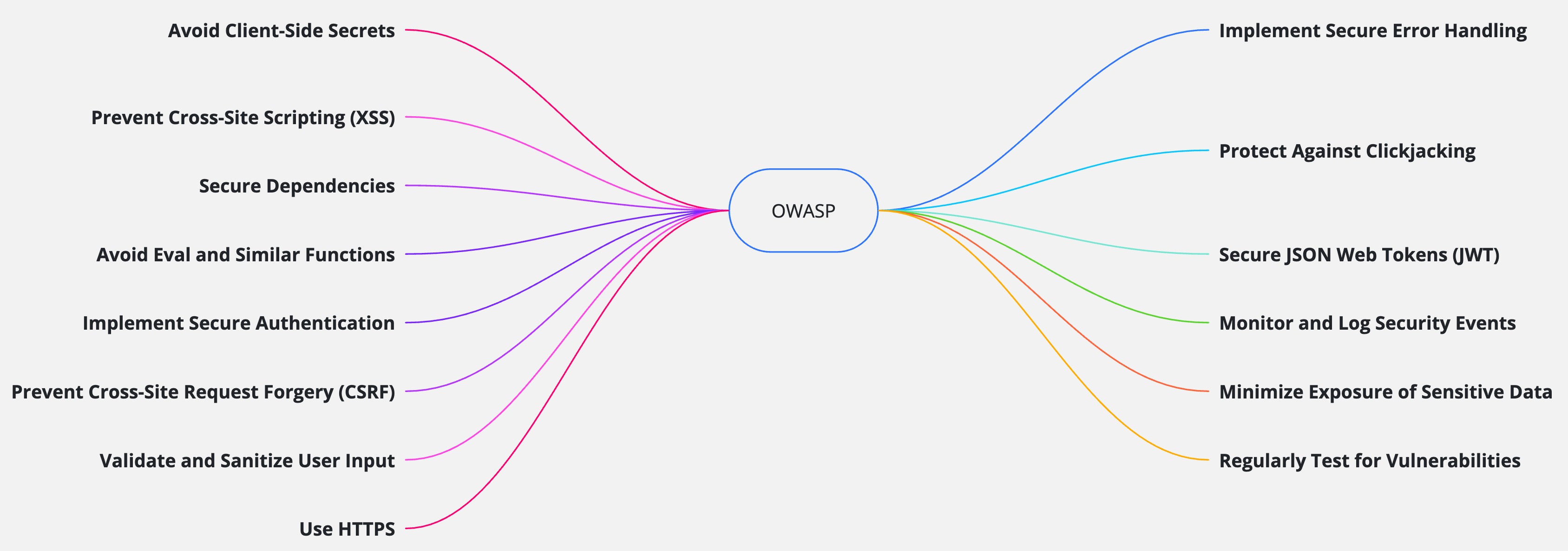
Why OWASP Security Matters
The Open Web Application Security Project (OWASP) provides the industry's most trusted security guidelines for protecting web applications from critical vulnerabilities
Vulnerability Prevention
Identify and prevent the most critical security vulnerabilities before they can be exploited by attackers in your applications.
Compliance Standards
Meet industry security standards and regulatory requirements with proven OWASP guidelines and security frameworks.
User Protection
Safeguard user data, privacy, and trust by implementing comprehensive security measures throughout your application.
Essential OWASP Security Rules for JavaScript
Master these critical security practices to build resilient, secure JavaScript applications
Avoid Client-Side Secrets
Storing sensitive information like API keys, tokens, or credentials in JavaScript code exposes them to anyone who can view your source code. This violates fundamental security principles and creates a major attack vector for malicious actors.
Secret Protection
Keeps API keys and credentials secure from client-side exposure and theft
Server Security
Maintains security boundaries between frontend and backend systems
Data Protection
Prevents unauthorized access to sensitive user data and system resources
❌ Vulnerable Implementation:
// ❌ BAD: Exposing API keys in frontend code
const API_KEY = "KMUFsIDTnFmyG3nMiGM6H9FNFUROf3wh7SmqJp-QV30";
const STRIPE_KEY = "sk_live_51H..."; // Visible to anyone!

// Sending requests with exposed credentials
fetch(`https://api.example.com/user?key=${API_KEY}`)
  .then(response => response.json())
  .then(data => console.log(data));

// Database credentials in frontend (NEVER do this!)
const DB_CONNECTION = "mongodb://admin:password123@localhost:27017/mydb";
✅ Secure Implementation:
// ✅ GOOD: Server-side API calls with hidden credentials
// Frontend makes request to your backend
fetch('/api/user', {
  method: 'GET',
  headers: {
    'Authorization': `Bearer ${userToken}`, // Only user token, not API keys
    'Content-Type': 'application/json'
  }
})
.then(response => response.json())
.then(data => console.log(data));

// Backend handles the actual API call with secret credentials
// server.js (Node.js backend)
app.get('/api/user', authenticateToken, async (req, res) => {
  try {
    const response = await fetch(`https://api.example.com/user?key=${process.env.API_KEY}`);
    const data = await response.json();
    res.json(data);
  } catch (error) {
    res.status(500).json({ error: 'Failed to fetch user data' });
  }
});
Security Best Practices: Always keep secrets server-side, use environment variables for configuration, implement proper authentication tokens, and never expose internal credentials in client-side code.
Prevent Cross-Site Scripting (XSS)
XSS attacks occur when malicious scripts are injected into web pages, allowing attackers to steal cookies, session tokens, or other sensitive information. This vulnerability can lead to account takeover and data theft.
Script Prevention
Blocks malicious JavaScript injection and execution in your application
Session Security
Protects user sessions and cookies from unauthorized access and theft
Data Integrity
Maintains data integrity and prevents content manipulation attacks
❌ Vulnerable Implementation:
// ❌ BAD: Directly inserting user input into DOM
const userComment = "<script>alert('XSS Attack!');</script>";
document.body.innerHTML = "<div>" + userComment + "</div>";

// ❌ BAD: Using eval with user input
const userCode = "document.cookie"; // Malicious input
eval("console.log(" + userCode + ")"); // Executes and steals cookies

// ❌ BAD: Unsafe innerHTML usage
const searchQuery = "<img src=x onerror=alert('XSS')>";
document.getElementById('results').innerHTML = `
  <h2>Search results for: ${searchQuery}</h2>
`;
✅ Secure Implementation:
// ✅ GOOD: Sanitizing input before rendering
import DOMPurify from 'dompurify';
const userComment = "<script>alert('XSS Attack!');</script>";
const cleanInput = DOMPurify.sanitize(userComment);
document.body.innerHTML = "<div>" + cleanInput + "</div>";
// ✅ GOOD: Using textContent instead of innerHTML for plain text
const searchQuery = "<img src=x onerror=alert('XSS')>";
document.getElementById('results').textContent = `Search results for: ${searchQuery}`;
// ✅ GOOD: Using safe DOM methods
const resultDiv = document.createElement('div');
resultDiv.textContent = userInput; // Automatically escapes content
document.body.appendChild(resultDiv);
// ✅ GOOD: Template literals with proper escaping
const escapeHtml = (unsafe) => {
return unsafe
.replace(/&/g, "&")
.replace(/</g, "<")
.replace(/>/g, ">")
.replace(/"/g, """)
.replace(/'/g, "'");
};
const safeHtml = `<p>${escapeHtml(userInput)}</p>`;XSS Prevention: Always sanitize user input with libraries like DOMPurify, use textContent instead of innerHTML for plain text, implement Content Security Policy (CSP), and validate all input on both client and server sides.
Secure Dependencies Management
Using outdated or vulnerable third-party libraries introduces security risks to your application. Attackers often target known vulnerabilities in popular packages to compromise applications at scale.
Dependency Security
Eliminates known vulnerabilities in third-party packages and libraries
Automated Updates
Maintains current security patches through automated dependency management
Vulnerability Monitoring
Continuously monitors and alerts about new security vulnerabilities
❌ Vulnerable Configuration:
// ❌ BAD: Using outdated packages with known vulnerabilities
{
  "dependencies": {
    "express": "4.16.0",     // Has 6+ known vulnerabilities
    "lodash": "4.17.15",     // Prototype pollution vulnerability
    "moment": "2.24.0",      // Multiple vulnerabilities
    "request": "2.88.0"      // Deprecated with security issues
  }
}

// ❌ BAD: Installing packages without checking security
npm install some-unknown-package --save

// ❌ BAD: Ignoring security warnings
npm audit --audit-level=none
✅ Secure Configuration:
// ✅ GOOD: Using latest secure versions
{
  "dependencies": {
    "express": "^4.18.2",   // Latest stable version
    "lodash": "^4.17.21",   // Security patches applied
    "dayjs": "^1.11.7",     // Secure alternative to moment
    "axios": "^1.3.4"       // Secure alternative to request
  }
}

// ✅ GOOD: Regular security auditing
npm audit --audit-level=moderate
npm audit fix

// ✅ GOOD: Automated dependency updates
npm install -g npm-check-updates
ncu -u && npm install

// ✅ GOOD: Package.json script for security checks
{
  "scripts": {
    "security-check": "npm audit && npm outdated",
    "update-deps": "ncu -u && npm install && npm audit"
  }
}
Dependency Management: Regularly update dependencies using npm audit, remove unused packages, implement automated security scanning in CI/CD, and monitor security advisories for your dependencies.
Avoid Eval and Code Injection
Functions like eval(), setTimeout() with strings, and setInterval() with strings can execute arbitrary code, creating severe security vulnerabilities that allow attackers to run malicious scripts in your application context.
Code Injection Prevention
Prevents attackers from injecting and executing malicious JavaScript code
Execution Control
Maintains strict control over what code can be executed in your application
Runtime Security
Eliminates runtime code injection vulnerabilities and dynamic execution risks
❌ Vulnerable Implementation:
// BAD: Using eval with user input
const userCode = "alert('XSS')";
eval(userCode); // Executes arbitrary code

// BAD: Using setTimeout with a string
setTimeout("alert('XSS')", 1000);
✅ Secure Implementation:
// GOOD: Avoid eval, use safer alternatives
const safeFunction = () => alert('Safe!');
safeFunction();

// GOOD: Use setTimeout with a function, not a string
setTimeout(() => alert('Safe!'), 1000);
Code Injection Prevention: Never use eval() with user input, always use function references instead of strings for timers, use JSON.parse() for data parsing, and implement strict input validation.
Implement Secure Authentication
Weak authentication mechanisms expose your application to unauthorized access, credential theft, and account takeover attacks. Proper authentication is the foundation of application security.
Identity Verification
Ensures only authorized users can access protected resources and data
Credential Security
Protects user credentials through proper hashing and secure storage
Multi-Factor Auth
Adds extra security layers with MFA and biometric authentication
❌ Vulnerable Implementation:
// BAD: Simple authentication with hardcoded credentials
function authenticate(username, password) {
    if (username === "admin" && password === "password123") {
        return true; // Insecure: credentials can be easily guessed or exposed
    }
    return false;
}
✅ Secure Implementation:
// GOOD: Using OAuth 2.0 for secure authentication
app.get('/auth/callback', (req, res) => {
    const authCode = req.query.code;
    // Exchange auth code for access token securely
    // Store tokens in HTTP-only cookies
});

// GOOD: Use secure authentication protocols and password hashing
const bcrypt = require('bcrypt');
const hashedPassword = getUserHashedPasswordFromDB(username);
const isValid = await bcrypt.compare(inputPass, hashedPassword);

if (isValid) {
  // Grant access
}
Authentication Security: Use industry-standard protocols like OAuth 2.0, implement proper password hashing with bcrypt, store tokens in HTTP-only cookies, and enable multi-factor authentication for enhanced security.
Prevent Cross-Site Request Forgery (CSRF)
CSRF attacks trick users into performing unintended actions on a web application where they are authenticated.
Bad
// BAD: No CSRF protection
app.post('/update-email', (req, res) => {
    const newEmail = req.body.email;
    // Update email without CSRF validation
    res.send("Email updated");
});
Without CSRF protection, an attacker can trick a logged-in user into submitting this form, changing their email without consent.
<form action="/update-email" method="POST">
    <input type="email" name="email" />
    <button type="submit">Update Email</button>
</form>
Good
// GOOD: Implement CSRF protection
const csrf = require('csurf');
const csrfProtection = csrf({ cookie: true });
app.use(csrfProtection);

app.post('/update-email', csrfProtection, (req, res) => {
    const newEmail = req.body.email;
    const token = req.body._csrf;
    // Validate CSRF token before updating email
    res.send("Email updated");
});
The server validates the csrf_token before processing
the request, ensuring it was submitted intentionally by the user.
<form action="/update-email" method="POST">
    <input type="hidden" name="_csrf" value="{{csrfToken}}" />
    <input type="email" name="email" />
    <button type="submit">Update Email</button>
</form>
Solution
- Use anti-CSRF tokens to validate requests.
- Implement SameSite cookies to restrict cross-origin requests.
- Require user re-authentication for sensitive actions.
Validate and Sanitize User Input
Unvalidated input can lead to injection attacks, such as SQL injection or XSS.
Bad
// BAD: No input validation or sanitization
app.post('/submit', (req, res) => {
    const userInput = req.body.input;
    db.query(`INSERT INTO data (input) VALUES ('${userInput}');
    res.send("Data submitted");
});

// BAD: Directly using user input in a SQL query
const query = "SELECT * FROM users WHERE name = '" + userInput + "'";
db.execute(query);
This code is vulnerable to SQL injection if
userInput contains malicious SQL code.
Good
// GOOD: Validate and sanitize user input
const { body, validationResult } = require('express-validator');
app.post('/submit',
    body('input').isAlphanumeric().trim().escape(),
    (req, res) => {
        const errors = validationResult(req);
        if (!errors.isEmpty()) {
            return res.status(400).json({ errors: errors.array() });
        }
        const userInput = req.body.input;
        db.query('INSERT INTO data (input) VALUES (?)', [userInput]);
        res.send("Data submitted");
});

// GOOD: Sanitizing input for HTML output
const cleanInput = DOMPurify.sanitize(userInput);
document.body.innerHTML = "<div>" + cleanInput + "</div>";
Parameterized queries prevent SQL injection, and sanitizing input before rendering prevents XSS.
Solution
- Validate input on both the client and server sides.
- Use regular expressions or libraries to enforce input constraints.
- Reject unexpected or malformed input.
- Sanitize input before using it in queries or rendering it in the DOM.
Use HTTPS
HTTP is not secure and can expose sensitive data to interception.
Bad
// BAD: Using HTTP for API requests
fetch('http://api.example.com/data')
    .then(response => response.json())
    .then(data => console.log(data));
Data sent over HTTP is not encrypted and can be read or modified by attackers during transit.
Good
// GOOD: Using HTTPS for API requests
fetch('https://api.example.com/data')
    .then(response => response.json())
    .then(data => console.log(data));
Data sent over HTTPS is encrypted, protecting user credentials, personal information, and other sensitive data.
Solution
- Always use HTTPS to encrypt data in transit.
- Redirect all HTTP traffic to HTTPS using server configurations.
- Use strong TLS configurations and keep certificates up to date.
Implement Secure Error Handling
Detailed error messages can expose sensitive information about the application’s structure or logic.
Bad
res.status(500).send("Database connection failed: password incorrect at db.js:42");This message reveals internal details that could help attackers target your system.
Good
res.status(500).send("An error occurred. Please try again later.");
// Log detailed error on server side
console.error("Database connection failed", err);
The user sees a generic message, while the server logs the details for troubleshooting.
Solution
- Log detailed errors on the server side for debugging and monitoring.
- Display generic error messages to users to avoid leaking sensitive information.
- Never expose stack traces, database errors, or internal paths in client-facing messages.
Protect Against Clickjacking
Clickjacking tricks users into clicking on elements of a web page
without their knowledge. This can lead to unauthorized actions
like changing settings or making purchases. To prevent
clickjacking, use the X-Frame-Options header to
control whether your site can be embedded in iframes.
Bad
// BAD: No protection against clickjacking
app.use((req, res, next) => {
    res.setHeader("X-Frame-Options", "ALLOWALL");
    next();
});
Without protection, attackers can frame your site and trick users into clicking hidden elements.
Good
// GOOD: Prevent clickjacking by denying framing
app.use((req, res, next) => {
    res.setHeader("X-Frame-Options", "DENY");
    next();
});
These headers prevent your site from being embedded in iframes, protecting users from clickjacking attacks.
Solution
-
Use the
X-Frame-Optionsheader to prevent your site from being embedded in an iframe. - Implement a Content Security Policy (CSP) to restrict framing.
Secure JSON Web Tokens (JWT)
Improper handling of JWTs can lead to unauthorized access.
Bad
// BAD: Storing JWT in localStorage
localStorage.setItem('token', jwtToken);
const token = localStorage.getItem('token');

// BAD: Using weak secret and long expiration
const token = jwt.sign({ userId: 123 }, "simpleSecret", { expiresIn: "7d" });
Using a weak secret and long expiration makes it easier for attackers to guess or brute-force the token, increasing the risk of compromise.
Good
// GOOD: Storing JWT in HTTP-only cookie
res.cookie('token', jwtToken, { httpOnly: true, secure: true });
const token = req.cookies.token;

// GOOD: Using strong secret and short expiration
const token = jwt.sign({ userId: 123 }, process.env.JWT_SECRET, { expiresIn: "15m" });

// GOOD: Validating token on the server side
jwt.verify(token, process.env.JWT_SECRET, (err, decoded) => {
  if (err) return res.status(401).send("Invalid token");
  // Proceed with authenticated request
});
Use strong secrets for signing tokens, set short expiration times, and always validate tokens on the server side.
Solution
- Use strong secrets for signing tokens.
- Set short expiration times for tokens.
- Validate tokens on the server side.
- Store JWTs securely (prefer HTTP-only cookies over localStorage).
- Revoke tokens when users log out or change passwords.
Monitor and Log Security Events
Lack of monitoring can delay the detection of security breaches. Implement logging and monitoring to track suspicious activities.
Bad
// BAD: Logging sensitive information
console.log("User login failed for user:", username, "with password:", password);

// BAD: No logging for authentication or sensitive actions
app.post('/login', (req, res) => {
  // No logs for failed/successful login attempts
  authenticateUser(req.body);
  res.send("Logged in");
});
Without logging, failed login attempts or suspicious activities cannot be detected or investigated.
Good
// GOOD: Avoid logging sensitive information
console.log("User login failed for user:", username);
// Log detailed error on server side
console.error("Login failed for user:", username, "Error:", err);

// GOOD: Logging critical security events
app.post('/login', (req, res) => {
  const success = authenticateUser(req.body);
  if (!success) {
    console.warn('Failed login for user: req.body.username');
  } else {
    console.info('Successful login for user: req.body.username');
  }
  res.send(success ? "Logged in" : "Login failed");
});
Logging authentication attempts helps detect brute-force attacks, account abuse, and other suspicious activities.
Solution
- Implement logging for critical events (e.g., login attempts, API calls, permission changes).
- Use monitoring tools to detect suspicious activity and alert administrators.
- Regularly review logs for anomalies and signs of compromise.
- Protect log files from unauthorized access and tampering.
Minimize Exposure of Sensitive Data
Exposing unnecessary data in API responses or JavaScript code increases the risk of data breaches.
Bad
// BAD: Storing sensitive data in localStorage
localStorage.setItem('userPassword', password);
const password = localStorage.getItem('userPassword');

// BAD: API response exposes internal fields and secrets
{
  "id": "123",
  "name": "Jane Doe",
  "passwordHash": "abc123xyz",
  "internalNotes": "VIP customer",
  "apiKey": "super-secret-key"
}
This response exposes sensitive fields like
passwordHash and apiKey, which should
never be sent to the client.
Good
// GOOD: Storing sensitive data in memory (not persistent)
let userPassword = password; // Stored in memory only
// Clear sensitive data from memory when no longer needed
userPassword = null;

// GOOD: API response includes only necessary public data
{
  "id": "123",
  "name": "Jane Doe"
}
Only public information is returned, reducing the risk of sensitive data exposure.
Solution
- Only include necessary data in API responses.
- Avoid exposing internal implementation details in JavaScript code.
- Sanitize and filter data before sending it to the client.
- Review API responses regularly to ensure sensitive data is not leaked.
Use Secure Coding Practices
Poor coding practices can introduce vulnerabilities. Adhere to secure coding guidelines, conduct code reviews, and use static analysis tools to identify potential security issues.
Bad
// BAD: Using var, which has function scope and can lead to bugs
var count = 0;
for (var i = 0; i < 10; i++) {
    count += i;
}
console.log(i); // i is accessible here, which can cause unexpected behavior
// BAD: Not handling promise rejections
fetch('https://api.example.com/data')
    .then(response => response.json())
    .then(data => console.log(data));
// No .catch() to handle errors
// BAD: Deeply nested callbacks (callback hell)
function fetchData(callback) {
    setTimeout(() => {
        callback(null, "data");
    }, 1000);
}
fetchData((err, data) => {
    if (err) {
        console.error(err);
    } else {
        fetchData((err, moreData) => {
            if (err) {
                console.error(err);
            } else {
                fetchData((err, evenMoreData) => {
                    if (err) {
                        console.error(err);
                    } else {
                        console.log(evenMoreData);
                    }
                });
            }
        });
    }
});
Good
// GOOD: Using let/const for block scope and immutability
let count = 0;
for (let i = 0; i < 10; i++) {
    count += i;
}
// console.log(i); // i is not accessible here, preventing accidental usage
// GOOD: Handling promise rejections with .catch()
fetch('https://api.example.com/data')
    .then(response => response.json())
    .then(data => console.log(data))
    .catch(error => console.error('Error fetching data:', error));
// GOOD: Using async/await for cleaner asynchronous code
async function fetchData() {
    try {
        const data = await getDataFromAPI();
        console.log(data);
    } catch (err) {
        console.error('Error fetching data:', err);
    }
}
fetchData();
Solution
- Follow secure coding guidelines provided by OWASP.
- Conduct regular code reviews to identify and fix security issues.
- Use static analysis tools to detect potential vulnerabilities in your code.
- Keep up to date with the latest security best practices and threats.
Regularly Test for Vulnerabilities
Regular security testing helps identify and remediate vulnerabilities before they can be exploited.
Bad
// BAD: No security testing in CI/CD pipeline
app.post('/deploy', (req, res) => {
    // Deploy code without any security checks
    res.send("Code deployed");
});
Without regular testing, vulnerabilities may go unnoticed, increasing the risk of exploitation.
Good
// GOOD: Integrate security testing in CI/CD pipeline
const { exec } = require('child_process');
exec('npm audit', (error, stdout, stderr) => {
    if (error) {
        console.error(`Audit error: ${error.message}`);
        return;
    }
    if (stderr) {
        console.error(`Audit stderr: ${stderr}`);
        return;
    }
    console.log(`Audit results: ${stdout}`);
    // Fail the build if vulnerabilities are found
    if (stdout.includes('found 0 vulnerabilities')) {
        console.log('No vulnerabilities found. Proceeding with deployment.');
    } else {
        console.error('Vulnerabilities found! Deployment halted.');
        process.exit(1);
    }
});
Regular testing helps ensure your application remains secure as new threats emerge.
Solution
- Conduct regular security assessments, including penetration testing and vulnerability scanning.
- Use automated tools to scan for common vulnerabilities.
- Stay informed about new threats and vulnerabilities in the JavaScript ecosystem.
- Incorporate security testing into your development lifecycle (DevSecOps).
OWASP Security Checklist
Essential security practices every JavaScript developer should implement
Secure Coding
- Never store secrets in client-side code
- Always sanitize and validate user input
- Use parameterized queries to prevent SQL injection
- Implement proper error handling without exposing internals
- Avoid eval() and similar dangerous functions
Authentication & Authorization
- Implement strong authentication mechanisms
- Use secure session management
- Enable multi-factor authentication (MFA)
- Implement proper access controls
- Use secure password hashing (bcrypt, Argon2)
Network Security
- Always use HTTPS in production
- Implement Content Security Policy (CSP)
- Configure secure HTTP headers
- Protect against CSRF attacks
- Prevent clickjacking with frame options
Dependencies & Monitoring
- Keep dependencies updated and secure
- Regular security audits with npm audit
- Monitor for security vulnerabilities
- Implement logging and monitoring
- Regular penetration testing
Key Security Takeaways
Building secure JavaScript applications requires constant vigilance and best practices
Security is Ongoing
Web security is not a one-time implementation but a continuous process. Stay updated with the latest OWASP guidelines, emerging threats, and security best practices to maintain robust protection.
Defense in Depth
Implement multiple layers of security controls. No single security measure is perfect, so combining authentication, input validation, encryption, and monitoring creates a comprehensive security posture.
Team Security Culture
Security is everyone's responsibility. Train your development team on secure coding practices, conduct regular security reviews, and foster a culture where security considerations are part of every development decision.
Final Security Recommendations
The OWASP Top 10 provides the foundation for web application security, but it's just the starting point. Regularly assess your applications, stay informed about emerging threats, and continuously improve your security practices.
Remember: Security vulnerabilities can have severe consequences including data breaches, financial losses, and damaged reputation. Invest in security from the beginning of your development process rather than treating it as an afterthought.
Additional Security Resources
- OWASP Foundation: Official guidelines and tools
- npm audit: Built-in dependency vulnerability scanner
- Snyk: Advanced security monitoring and testing
- NIST Cybersecurity Framework: Comprehensive security guidance